If your restaurant is open, legitimate, has a website and a Google Business Profile, but customers still struggle to find it on Google, you are not necessarily doing something wrong.
Restaurant visibility on Google depends on several different systems working together. Your Google Business Profile, website, reviews, local relevance, location, citations, content and overall prominence can all affect how your business is discovered.
There is another layer to consider now: Google AI Overviews. These AI-generated responses can appear for some searches, but they do not appear for every query, and there is no special submission form or guaranteed AI-specific SEO technique that will make a restaurant appear in them. Google says the same fundamental SEO practices used for Search remain relevant to AI features.
This guide will help you diagnose why your restaurant is difficult to find and gives you a practical 30-day plan for improving discoverability in Google Search, Google Maps, the Local Pack and, where relevant, AI-powered search experiences.
1. Quick Diagnosis: What Does “Not Appearing” Actually Mean?
Before changing your website, Business Profile or SEO strategy, determine exactly where the problem occurs.
“My restaurant isn't showing on Google” can mean several completely different things. Each situation requires a different solution.
| Problem | What It May Indicate | First Action |
|---|---|---|
| Your restaurant does not appear when searching its exact name | Profile verification, suspension, duplication, indexing or information problems | Check the Google Business Profile and search for your exact business name and website |
| You appear for your name but not “Indian restaurant near me” | Local relevance, distance or prominence issues | Review your categories, services, website content and local signals |
| You appear on Google Maps but not normal organic Search | Your Business Profile and website are being treated differently | Check website indexing and organic SEO separately from Maps visibility |
| You appear in organic Search but not the Local Pack | Local ranking factors such as relevance, distance and prominence | Review your Business Profile and local authority |
| You appear in Search but not an AI Overview | The query may not trigger an AI Overview or your content may not be selected | Improve foundational SEO and provide clear, useful information |
| You appear in one location but not another | Local search results vary according to the searcher's location | Test from different locations without assuming one ranking represents everyone |
Google explains that local results are primarily influenced by relevance, distance and prominence. That means there is no single “restaurant ranking switch” you can turn on.
Owner advice: Do not start by adding dozens of keywords. First determine whether you have a visibility problem, an indexing problem, a relevance problem, a local prominence problem or simply a location-dependent ranking difference.
2. The Main Reasons Your Indian Restaurant Is Not Visible on Google
Your Google Business Profile is not properly verified
Your Google Business Profile is one of the most important sources of information Google uses for local search.
If the profile is unverified, suspended, disabled or affected by another problem, your restaurant may not receive the local visibility you expect.
Google states that verification helps establish that you are authorised to represent the business, while complete and accurate information makes a Business Profile more likely to appear for relevant local searches.
Also check whether another profile exists for the same restaurant. Duplicate profiles can create confusion and may result in the wrong profile being surfaced.
Your business information is inaccurate
Check your real-world business information carefully:
- Business name
- Street address
- Map pin
- Telephone number
- Website URL
- Opening hours
- Holiday hours
- Menu URL
- Reservation and ordering links
Google combines information supplied by business owners with information from public websites, third-party sources, users and other sources when building local business information. Consistency therefore matters.
You selected the wrong primary category
Your primary Business Profile category helps Google understand what your business is.
For example, an Indian restaurant should not choose a category simply because it contains a keyword the owner wants to rank for. Select the category that most accurately represents the real business, then use appropriate additional categories where relevant and available.
Your profile does not explain what you actually offer
An Indian restaurant can be much more specific than simply saying “Indian food.” Your business may offer North Indian cuisine, South Indian dishes, Bengali food, Gujarati food, Mughlai dishes, vegetarian food, vegan options, biryani, catering, private dining, takeaway or delivery.
Make sure the information customers need is clearly represented across the appropriate parts of your profile and website.
For more detail, see our guide to optimizing your Google Business Profile.
Distance is working against you
Sometimes there is no technical problem at all.
A restaurant can have a perfectly optimised profile and still appear lower for someone searching from several miles away because local results are influenced by distance from the searcher or the location used in the search.
This is particularly important for phrases such as:
- Indian restaurant near me
- Indian restaurant near [landmark]
- Biryani near me
- Indian takeaway near me
Do not judge local performance from a single search performed from one location.
Your competitors have stronger local prominence
Google's concept of prominence relates to how well-known a business is. Google says prominence can be influenced by information such as links from other websites and reviews.
A long-established Indian restaurant in Birmingham, Leicester or London may therefore have a stronger collection of local signals than a restaurant that opened six months ago.
That does not mean the newer restaurant cannot build visibility. It means the process may require consistent work across reviews, website content, local mentions, links and accurate business information.
Your website is not indexed
Your website cannot perform in organic Google Search if important pages cannot be crawled or indexed.
Common causes include:
- A
noindexdirective - Robots.txt blocking crawling
- Server or hosting problems
- Incorrect canonical tags
- Pages that are difficult to discover through internal links
- Very thin or low-value pages
- Technical configuration problems
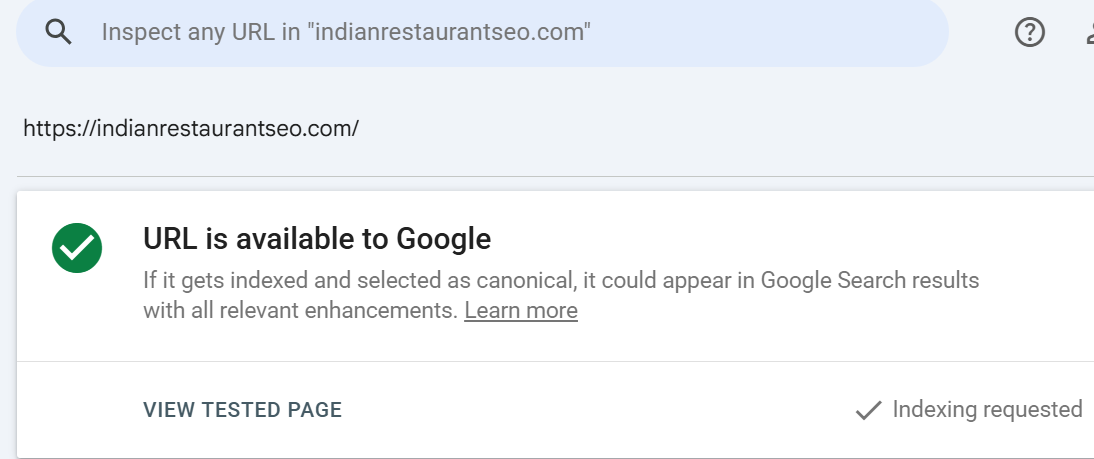
Google's URL Inspection tool can show whether Google has an indexed version of a page and can also test whether the live URL is indexable.
Your website does not clearly communicate your restaurant
Imagine a restaurant website where the homepage simply says:
“Welcome to our restaurant. We serve delicious food. Visit us today.”
That does not give Google or customers much useful information.
A stronger website should clearly communicate the cuisine, location, menu, services and important customer information.
For example:
- Indian restaurant in [Area]
- North Indian and Mughlai cuisine
- Vegetarian and vegan options
- Dine-in and takeaway
- Delivery areas
- Private dining
- Catering
- Opening hours
- Menu
- Directions and contact details
These should be communicated naturally rather than stuffed into pages repeatedly.
Your menu is difficult for Google and customers to read
If your entire menu exists only as a photograph or a difficult-to-read PDF, customers may struggle to use it and important information may be less accessible to search engines.
Whenever practical, provide menu items as accessible HTML text on a dedicated menu page.
For example, instead of only uploading an image containing “Chicken Tikka Masala,” provide the dish name and relevant description as readable page content as well.
Your website has technical or mobile usability problems
Restaurant customers frequently search from mobile devices, often when they are hungry and ready to act.
Your website should make it easy to:
- Call the restaurant
- View the menu
- Get directions
- Reserve a table
- Order takeaway
- Find delivery information
- See opening hours
Technical SEO matters, but the ultimate objective is not simply to improve a technical score. It is to make the restaurant easier to understand and easier to choose.
Your reviews and local signals are weak
Reviews can influence customer trust and are also among the information Google considers in local search. Google specifically identifies reviews as one source of information related to prominence.
A restaurant with very few reviews, irregular review activity or unresolved customer complaints may have a weaker reputation signal than a well-established competitor.
This does not mean you should manufacture reviews. Fake reviews, purchased reviews and review manipulation are risky and undermine customer trust.
Instead, build a legitimate process for asking real customers for honest feedback.
Your restaurant is operating in a highly competitive area
Ranking for “Indian restaurant in London” is fundamentally different from establishing visibility for a smaller local search such as “Indian restaurant in [specific neighbourhood].”
The broader and more competitive the search, the more difficult it can be for an individual restaurant to stand out.
Start by making your business highly relevant to the locations, cuisine types and services you genuinely serve rather than trying to rank for every possible restaurant keyword.
3. Google Business Profile Checklist for Indian Restaurants
Work through this checklist before making major changes to your website.
- Verification: Confirm the profile is verified and check for suspension or other restrictions.
- Business name: Use the real-world business name. Do not add keywords or neighbourhoods simply to manipulate rankings.
- Address: Confirm the address is accurate and the map pin is correctly positioned.
- Categories: Choose the most accurate primary category and relevant secondary categories.
- Hours: Check normal opening hours, holiday hours and temporary closures.
- Phone: Use the correct customer-facing telephone number.
- Website: Link to the correct official website.
- Menu: Add the correct menu URL where supported.
- Reservations: Add the legitimate reservation link.
- Ordering: Add appropriate takeaway or delivery links.
- Services: Accurately describe services such as catering, takeaway, delivery or private dining where applicable.
- Description: Explain the restaurant naturally, including cuisine and location.
- Photographs: Use original, high-quality images of the exterior, interior, food and relevant facilities.
- Products or menu items: Use available features where appropriate and accurate.
- Reviews: Respond professionally to both positive and negative reviews.
- Updates: Keep important information current.
- Duplicates: Check that another profile has not been created for the same business.
- Consistency: Check your business information across important third-party platforms.
A natural restaurant description might look like this:
[Restaurant Name] is a [regional cuisine] restaurant in [neighbourhood, city] serving [signature dishes]. We offer [dine-in/takeaway/delivery/catering] and are located near [legitimate landmark or area].

Google explains that Business Profile information can be combined with information from the official website, third-party sources and users, so keeping important business facts consistent is worthwhile.
For a broader process, use our local SEO checklist for restaurants.
4. Restaurant Website SEO Checklist
Your Google Business Profile and website should work together rather than being treated as separate SEO projects.
Homepage
Make the homepage immediately explain who you are, what cuisine you serve, where you are located and what customers can do next.
Dedicated location page
If location is important to your business, create useful pages that genuinely serve specific locations rather than producing dozens of near-identical pages for every neighbourhood.
Menu page
Make your menu easy to find and readable on mobile. Use HTML text for important menu information where possible.
Service pages
Create useful pages for genuine services such as catering, takeaway, delivery or private dining.
Reservation page
Make table reservations easy to find and use.
Contact page
Include the restaurant's name, address, phone number, opening hours and useful directions information.
About page
Explain the restaurant's story, cuisine and experience in a way that adds genuine value rather than generic SEO copy.
FAQ section
Answer real customer questions about parking, dietary options, reservations, catering, delivery, opening hours and cuisine.
Mobile experience
Ensure buttons are easy to tap and the most important actions are immediately visible.
Titles, headings and internal links
Use descriptive page titles and headings. Connect related pages with useful internal links such as restaurant website SEO best practices.
Click-to-call and directions
Make phone calls and directions easy to access, especially on mobile.
Menu and image accessibility
Use readable HTML for important menu content and descriptive alt text for meaningful images.
XML sitemap and indexing
Make sure important pages can be discovered and indexed by Google.
Example page title: [Cuisine] Restaurant in [Area] | [Restaurant Name]
Example meta description: Enjoy [signature dishes] at [Restaurant Name], a [cuisine] restaurant in [area]. View our menu, opening hours, directions, reservations, and takeaway options.
If you are unsure where to start, our restaurant keyword research guide can help you identify the searches your customers actually use.
5. How to Improve Visibility in Google AI Overviews
AI Overviews can make restaurant owners understandably curious about “AI SEO.” But there is an important point to understand:
There is no special AI Overview submission process or guaranteed AI Overview schema.
Google's current guidance says there are no additional technical requirements or special optimisations required for inclusion in AI Overviews or AI Mode. Pages need to meet Google's normal technical requirements and be eligible to appear in Search.
AI Overviews are also query-dependent. Google says AI Overviews only appear when its systems determine that an AI-generated result adds value to the Search experience, so they will not trigger for every search.
For a restaurant, the practical approach is therefore to make your information easy for both customers and search systems to understand.
Think about natural questions customers might ask:
- What is the best vegetarian Indian restaurant in [area]?
- Where can I find halal Indian food near [landmark]?
- Does [Restaurant Name] offer catering?
- Is [Restaurant Name] open on Sunday?
- Does the restaurant offer takeaway or delivery?
- Which Indian restaurant serves Bengali food in [city]?
- Where can I find South Indian food in [city]?
Your website should answer genuine questions like these clearly where relevant.
You can also use appropriate restaurant schema markup when it accurately represents information visible on the page.
However, structured data should not be treated as a shortcut to an AI citation. Google specifically states that there is no special schema required for AI features, and structured data should match the visible content on the page.
Also avoid publishing hundreds of automatically generated location pages simply because you want to appear for more searches. Google warns that generating large amounts of content with little added value can fall under its spam policies.
6. Reviews, Reputation and Local Prominence
Reviews are both a customer-trust asset and part of the broader information surrounding a local business.
The right approach is simple: create a reliable process for asking genuine customers for honest reviews.
Ask customers naturally
For example:
Hi [Customer Name], thank you for dining with us at [Restaurant Name]. We hope you enjoyed your [dish/service]. If you have a moment, we'd appreciate an honest Google review about your experience. Your feedback helps our team and helps other local customers discover us. Thank you!
Do not tell customers what rating to leave. Do not create fake reviews. Do not buy reviews. Do not offer incentives that violate platform policies. And do not selectively ask only customers you believe will leave positive reviews.
Respond to negative reviews professionally. If customers repeatedly mention slow service, parking problems, food temperature or another operational issue, treat the pattern as useful business feedback.
For a structured reputation process, see our restaurant review management guide.
7. Local Citations, Links and Community Visibility
Your restaurant should have consistent information across relevant websites and directories.
Depending on the UK market and your location, useful sources may include relevant food publications, local newspapers, tourism websites, chambers of commerce, community organisations, event websites and reputable local directories.
Consider genuine relationships with:
- Nearby hotels
- Local offices
- Event planners
- Cultural organisations
- Community groups
- Local food publications
- Relevant food creators
- Local event organisers
The objective is not to obtain hundreds of directory links. It is to build legitimate local visibility and references to the business.
Use our local citation guide to audit important business listings.
Avoid buying large quantities of low-quality backlinks or participating in link schemes. Relevance and genuine local relationships are more useful than artificial volume.
8. Google Search Console Troubleshooting
If your website is not appearing in Google Search, Google Search Console should be one of your first diagnostic tools.
Search Console provides information about Search traffic, indexing, individual URLs and queries that bring users to your website.
Use URL Inspection
Enter important URLs such as your homepage, menu page, location page and catering page into URL Inspection.
Check:
- Whether Google knows about the URL
- Whether the URL is indexed
- Whether crawling is allowed
- Whether indexing is allowed
- Whether Google encountered a fetch problem
- Which canonical URL Google selected
Google notes that being “on Google” does not guarantee that a page will appear for a particular search query. Indexing and ranking are separate issues.
Check the Page Indexing report
The Page Indexing report can help identify pages Google has found and indexing problems affecting your website.
Check your sitemap
Make sure your XML sitemap is available and submitted through Search Console when appropriate.
Check Manual Actions and Security Issues
If there is a serious website problem, review these reports rather than assuming the issue is simply “bad SEO.”
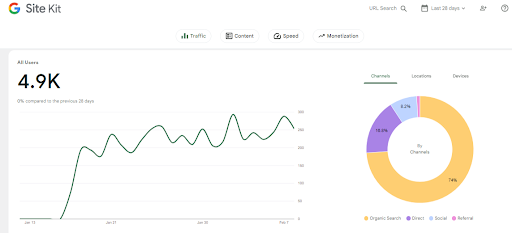
Study your Search performance
Look at:
- Impressions
- Clicks
- Click-through rate
- Average position
- Search queries
- Search appearance
- Brand searches versus non-brand searches
Do not measure success only by one ranking position. A restaurant's actual business outcomes can include phone calls, direction requests, reservations, takeaway orders and website visits.
[INSERT YOUR GSC DATA: impressions, clicks, CTR, average position, date range]
For a deeper walkthrough, use our Google Search Console guide.
9. A 30-Day Restaurant Visibility Action Plan
| Period | Task | Priority | Estimated Effort | Expected Purpose | Owner |
|---|---|---|---|---|---|
| Days 1–3 | Verify Business Profile, check suspension and duplicates | Critical | 1–2 hours | Establish that the correct profile is active | Owner / SEO |
| Days 3–5 | Audit name, address, phone, hours, website and map pin | Critical | 1–2 hours | Correct inaccurate business information | Owner / SEO |
| Days 5–7 | Inspect important website URLs in Search Console | Critical | 1–2 hours | Identify indexing or crawl problems | SEO / Developer |
| Week 2 | Improve categories, menu, services, photos and profile information | High | 3–5 hours | Improve business relevance and customer information | Owner / SEO |
| Week 2 | Improve homepage, menu and contact/location pages | High | 4–8 hours | Make the website clearer and more useful | SEO / Developer |
| Week 3 | Establish a genuine review-request process | High | 1–2 hours setup | Build legitimate customer feedback and reputation | Owner / Staff |
| Week 3 | Audit citations and local references | Medium | 2–4 hours | Improve consistency and local discoverability | SEO |
| Week 3 | Create useful local and cuisine-specific content | Medium | 3–6 hours | Answer customer questions and strengthen topical relevance | SEO / Content |
| Week 4 | Review Search Console and Business Profile performance | High | 1–2 hours | Measure changes and identify next opportunities | Owner / SEO |
| Week 4 | Test calls, directions, reservations and ordering journeys | High | 1–2 hours | Ensure visibility translates into customer actions | Owner |
The goal of the first 30 days is not to chase a guaranteed ranking. It is to remove preventable problems, improve the information Google and customers receive, and establish a system for measuring progress.
10. Common Restaurant SEO Mistakes to Avoid
- Keyword-stuffing the business name: Keep the profile name aligned with the real-world business name.
- Using a virtual or false address: Do not create misleading location signals.
- Creating a profile for every neighbourhood: Do not create duplicate profiles simply to target additional locations.
- Using only food photographs: Include useful original images that help customers understand the restaurant.
- Keeping the menu as an unreadable image: Provide accessible menu content where possible.
- Ignoring holiday hours: Keep important operating information current.
- Using a generic homepage title: Make important pages descriptive and useful.
- Publishing mass AI-generated pages: Content should provide genuine value and local expertise rather than simply filling a website with keywords.
- Buying reviews: Build your review profile through genuine customer experiences.
- Buying backlinks: Focus on relevant, legitimate local relationships and mentions.
- Stuffing keywords into every paragraph: Write for customers first.
- Measuring only rankings: Track calls, directions, bookings, orders, website visits and qualified enquiries as well.
11. Frequently Asked Questions
Why does my restaurant show on Maps but not Google Search?
Google Maps and organic Search use related but different systems. Your Business Profile may be visible in local results while your website has indexing, relevance or organic SEO issues. Check your website in Search Console and inspect important URLs.
How long does it take for a new restaurant to appear on Google?
There is no universal timetable. Google must discover and process your website and business information, while local visibility also depends on factors such as relevance, distance and prominence. Indexing a page does not guarantee that it will rank for a particular search.
Can I pay Google to appear in organic Search or AI Overviews?
No. Google states that there is no way to request or pay for a better local ranking. Paid advertising is a separate system from organic Search and local ranking.
Does adding keywords to my Business Profile name help?
Your business name should represent the real-world name of the restaurant. Adding extra keywords or locations that are not part of the actual name creates inaccurate information and is not an appropriate local SEO tactic.
Why do competitors rank above my restaurant?
Local results can differ based on relevance, distance and prominence. Competitors may also have stronger established local signals, reviews, links or customer recognition. Compare their legitimate strengths rather than copying information that does not accurately describe your business.
Does restaurant schema guarantee AI Overview visibility?
No. Google says there is no special structured data or schema required for AI Overviews. Appropriate structured data can help Google understand eligible content when it accurately matches visible information, but it does not guarantee inclusion in an AI Overview.
How often should I update my restaurant profile?
There is no useful universal update frequency. Update information whenever something important changes, particularly opening hours, holiday hours, menus, ordering options, contact information and services.
What should I do if my Google Business Profile is suspended?
First identify the reason for the suspension and review the relevant Google Business Profile guidelines. Do not create another profile simply to bypass the suspension. Correct the underlying problem and follow Google's reinstatement process where applicable.
How can I check whether Google indexed my website?
Use Google Search Console's URL Inspection tool for individual pages. Google also recommends appropriate Search Console reports and search operators such as site:example.com for basic checks. Remember that an indexed URL is eligible to appear but is not guaranteed to appear for every query.
What should I measure in Google Search Console?
Review impressions, clicks, click-through rate, average position and the queries generating visibility. Compare branded searches with non-branded local searches and monitor important pages over a consistent date range.
12. What About Restaurant Schema Markup?
Structured data can help Google understand information on your pages when it accurately represents visible content.
For an eligible restaurant website, relevant structured data may communicate information such as the business type, name, address, opening hours and other supported details.
But schema should be treated as a supporting technical implementation, not a ranking shortcut.
Google's guidance for AI features explicitly says there is no special schema.org markup required to appear in AI Overviews or AI Mode. It also recommends that structured data match the visible text on the page.
For implementation guidance, see our restaurant schema markup guide.
13. Content That Can Help an Indian Restaurant Become More Discoverable
A restaurant website should not become a collection of pages written solely for search engines.
Instead, create content that answers questions customers genuinely have.
Examples include:
- What makes your North Indian menu different?
- Where can customers find vegetarian Indian food in [area]?
- Does your restaurant provide halal options?
- What dishes are suitable for a family dinner?
- Does the restaurant offer corporate catering?
- How does your takeaway service work?
- Can customers book private dining?
- Which dishes are popular for sharing?
- What South Indian dishes are available?
- Does the restaurant cater for vegan or dietary requirements?
Use our restaurant content marketing guide to develop useful topics without turning every article into a keyword-stuffed landing page.
Useful content can support organic visibility, but there is no guarantee that any individual article will rank or be selected by an AI Overview.
14. How Google Maps Ranking Fits Into the Bigger Picture
If your main concern is “Why is my restaurant not showing on Google Maps?”, focus on the local side of the problem.
Google says local ranking is primarily based on relevance, distance and prominence.
That means a sensible Maps strategy includes:
- An accurate and verified Business Profile
- Correct categories
- Complete business information
- Accurate opening hours
- Relevant services and attributes
- Useful photographs
- Genuine customer reviews
- Consistent information across important websites
- A strong, relevant restaurant website
- Legitimate local mentions and relationships
For a deeper local strategy, see our Google Maps ranking guide for restaurants.
15. The Most Important Thing to Remember
If your restaurant does not appear on Google, resist the temptation to change everything at once.
Start with diagnosis.
- Check whether your Google Business Profile is verified and healthy.
- Confirm your business information is accurate.
- Check for duplicate profiles.
- Review your primary category and relevant services.
- Test whether your website is indexed.
- Inspect important URLs in Google Search Console.
- Make your restaurant's cuisine, location and services clear.
- Make your menu accessible and easy to use.
- Build genuine reviews and respond professionally.
- Develop legitimate local references and relationships.
- Answer real customer questions on your website.
- Measure business outcomes rather than rankings alone.
Good local SEO is not about convincing Google that your restaurant is something it isn't. It is about making the real business easier for Google and customers to understand, verify and discover.
Conclusion
So, why is your restaurant not showing on Google?
There may be a technical problem. Your Business Profile may be incomplete or inaccurate. Your website may not be indexed. Your restaurant may lack sufficient local prominence. Your competitors may have stronger established signals. Or the search you are testing may simply be affected by the searcher's location and the way Google generates local results.
AI Overviews add another layer, but they do not require a secret “AI SEO” strategy. Google says the same foundational SEO practices remain relevant: technically accessible pages, useful people-first content, strong internal linking, clear text, accurate structured data and up-to-date Business Profile information.
The best place to start is therefore not with another batch of keywords or hundreds of AI-generated pages.
Start with an audit.
Find the exact point where your restaurant disappears from the customer journey, fix the underlying problem, and then measure whether those improvements lead to more qualified visibility, calls, direction requests, reservations, takeaway orders and website visits.
That is a much more useful definition of restaurant SEO success than simply seeing a number next to your restaurant in a ranking report.
Recommended Next Steps
- Optimize your Google Business Profile
- Use the local SEO checklist for restaurants
- Research restaurant keywords based on customer intent
- Improve your restaurant review management process
- Troubleshoot your website with Google Search Console
- Improve your restaurant website SEO
- Implement restaurant schema markup correctly
- Audit your local citations
- Build a useful restaurant content strategy
- Improve your Google Maps visibility